
TRMNL display
Displaying booking information in the right places and in a suitable form is an effective enhancement of the entire booking ecosystem. Various forms of information visualization, so-called digital signage, bring greater user comfort and clarity for customers. The reenio system directly supports the TRMNL platform, which is a solution primarily built on its own display panels using electronic paper (e-ink) technology.

The TRMNL platform itself offers a wide range of use cases. It enables device management via a web portal, the use of various information presentation scenarios, and a broad selection of plugins and display variants. On a single e-ink panel, it is easy to display weather information, operational information, an advertising banner, and information about the current reservation, in different layouts or playback scenarios.
Direct and up-to-date display of information is suitable wherever there is a larger number of people rotating over time, e.g. for sports facilities, shared offices and spaces, medical practices, services with waiting rooms, ...
TRMNL is a combination of simple hardware and a flexible software platform that can serve very well and efficiently for displaying important information in public or work spaces. For the easiest possible use of this platform together with the reenio reservation system, a plugin is available that ensures direct connection of the display to specific reservation data without the need for programming or complex setup. The image below shows examples of various display options and situations for presenting reservation information using this plugin.
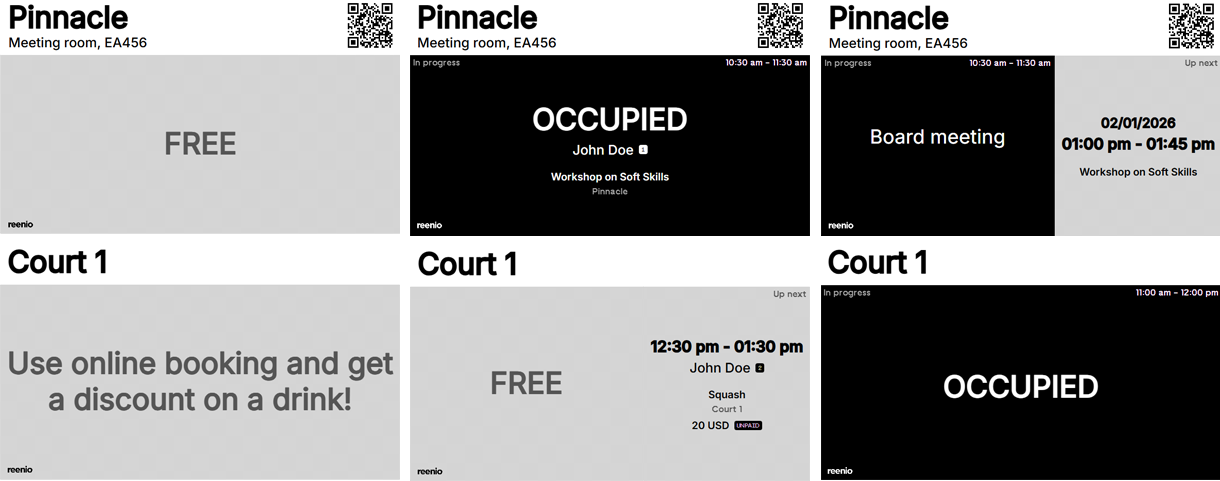
TRMNL devices
The main element of the entire platform is TRMNL display devices. Typically, this is an e-ink display with a diagonal of 7.5" or 10.3", complemented by a battery and electronics with Wi-Fi connectivity. The overall architecture is based on the principle that the display content is updated at set intervals, and during the remaining time the device "sleeps" and, thanks to e-ink technology, practically does not consume battery power. This makes it possible to place the device in various locations without the need for a power connection, while being able to operate for weeks to months on a single charge.
Devices delivered directly under the TRMNL brand are ready to use immediately, and their setup and configuration are very simple. In addition, the TRMNL platform offers other display options, including on self-built devices, devices from other vendors, or devices such as Raspberry Pi, Apple iPad, etc. These options, however, already require technical knowledge for HW/SW installation and configuration. More information can be found on GitHub.
The TRMNL device can be purchased online on the shop.trmnl.com website. Primarily, it is an american company shipping products from the USA, sales and shipping for Europe are handled from Berlin/EU. When purchasing, you can use the REENIO10 code to receive a discount worth USD 10.
Settings
TRMNL devices are very easy to set up and operate; after purchase, it is sufficient to follow the included instructions. The result of the initial initialization is an active device connected to the internet and paired with a TRMNL user account. Within the web administration, it is possible to manage all your TRMNL devices, set up playback scenarios, or install available extensions. For configuring the connection with the booking system itself, it is therefore necessary to have a functioning and activated display available in the web administration.
- To connect to the reservation system, you need to have an API key prepared. You can obtain this in the reservation system administration, where it is possible to create an API key intended as “read-only” and therefore suitable for this integration.
REENIO - API
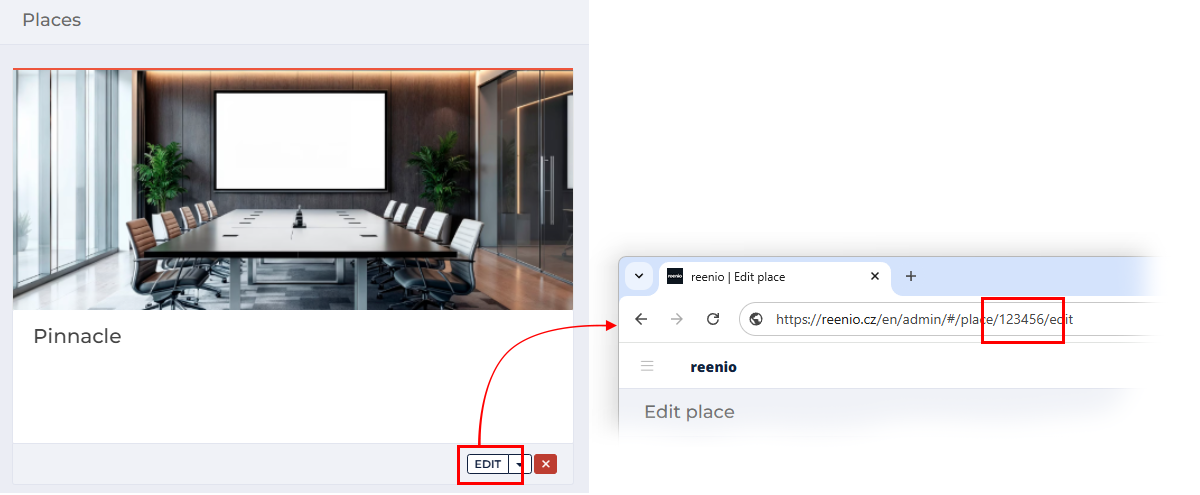
Each plugin installation is always tied to a specific Resource, i.e. Place, Employee, or Service. It is therefore necessary to determine what information the display will show and, based on that, find out the ID of the given resource, e.g. a sports facility with 4 courts, where each has its own TRMNL display and shows a different Place data from the reservation system.
You can find this ID by clicking "Edit" for the given resource in the reenio administration and then reading the corresponding ID from the browser’s address bar.

Now you can proceed to install the plugin itself. In the administration of the given TRMNL device, open the Plugins and search for the plugin (Recipes) named “reenio - booking system”. After opening the detail, click the "Install" button.
Install the TRMNL pluginAfter clicking the "Install" button, the plugin configuration page will be displayed. Within one device, the plugin can be installed multiple times and display different information - therefore it is good to name each specific installation clearly for better overview. Another important parameter is “Refresh rate”, which determines how often the data for display is updated. We recommend setting the smallest available value, i.e. every 15 minutes.
If this value is too high and the data is not updated sufficiently in time, it is possible to activate an additional TRMNL+ subscription, which allows data updates as often as every 5 minutes. This subscription is activated for the entire account and costs USD 5 per device per month.Further plugin settings are related to the specific display and data loading from the reservation system. It is crucial to set the language, API key, resource type, and its ID. Other parameters then affect the display method or the level of detail of the displayed information. All parameters can be changed continuously as needed, and the resulting information presentation can then be tested.
Once the plugin is configured, it can be added to a playback scenario, the so-called "Playlist". This allows comprehensive management of what, when, and how will be displayed on a specific screen. The reenio plugin can thus alternate not only with the display of an advertising image or notification, but it is also possible to create collages of multiple plugins and combine multiple pieces of information at once (the detail and display method adapt to the available space).
Integration of the TRMNL platform and the reenio system requires API functionality, which is available as part of the Premium subscription.
To display information on a TRMNL screen, it is sufficient to purchase a specific TRMNL device once. For normal operation, no additional operating costs for the plugin or subscriptions on the TRMNL side are required. If data updates at 15-minute intervals are not sufficient for normal operation, this limit can be reduced (down to 5 minutes) through the additional/optional TRMNL+ subscription.
 booking system